





Thaiware Shop
จำหน่าย จัดหา ซอฟต์แวร์ลิขสิทธิ์ สำหรับองค์กร ฯลฯ

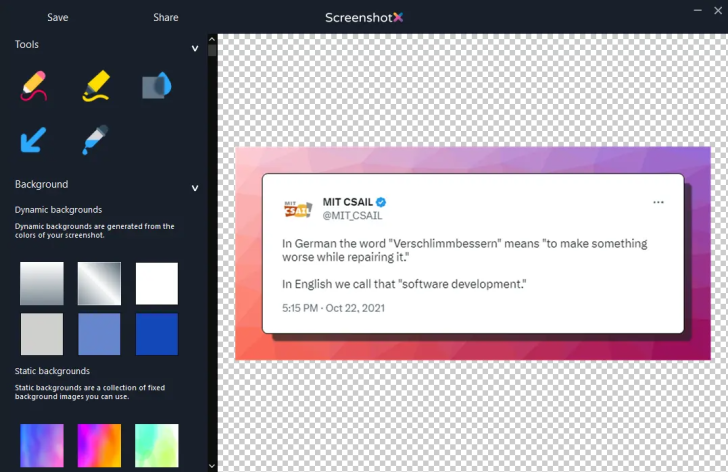
ScreenshotX (โปรแกรมแคปหน้าจอ Windows ฟรี ใช้ง่าย สวยทันที) : โปรแกรม ScreenshotX เป็นโปรแกรมแคปหน้าจอ (Snipping Tool) สำหรับ ระบบปฏิบัติการ (OS) ยอดนิยมอย่าง วินโดวส์ (Windows) ที่พัฒนามาเพื่อแก้ปัญหาภาพแคปหน้าจอที่ดูธรรมดา หรือรกสายตา ให้กลายเป็นภาพที่สวยงาม และพร้อมนำไปใช้งานนำเสนอ, คู่มือ หรือแชร์ต่อได้ทันที โดยเป็นซอฟต์แวร์ที่มีขนาดเล็กเพียงราว 3 MB, ไม่กินทรัพยากรเครื่อง, ไม่มีสปายแวร์ หรือโฆษณาแอบแฝง รองรับตั้งแต่ Windows 7 ไปจนถึง Windows 11 และมีให้เลือกใช้งานทั้งเวอร์ชันติดตั้งปกติ กับ โปรแกรมแบบพกพา (Portable Application) ที่เปิดใช้งานได้ทันทีโดยไม่ต้องติดตั้ง
จุดเด่นหลักของโปรแกรม ScreenshotX อยู่ที่ความสามารถในการจับภาพทั้งแบบเลือกพื้นที่อิสระ หรือเลือกจับภาพเฉพาะหน้าต่างโปรแกรมใดโปรแกรมหนึ่ง เมื่อจับภาพเสร็จแล้วระบบจะดึงภาพเข้าสู่หน้าแก้ไขในตัวทันที ซึ่งมีระบบจัดสมดุลอัตโนมัติ (Automatic Balancing) ช่วยจัดวางวัตถุให้อยู่กึ่งกลางภาพพร้อมเว้นระยะขอบให้อย่างพอดี สามารถใส่พื้นหลังสีสันสวยงามรองหลังภาพ เพิ่มความน่าสนใจคล้ายกับภาพกราฟิกสำเร็จรูป มีเครื่องมือเบลอข้อมูลเพื่อปิดบังความลับส่วนตัว เช่น ที่อยู่อีเมล, รหัสผ่าน หรือชื่อบุคคล รวมถึงมีพู่กันสำหรับวาด, ปากกาไฮไลต์เน้นข้อความ และเครื่องมือดูดสีที่แนะนำชุดสีคู่ตรงข้ามให้เสร็จสรรพ
ด้านการนำไปใช้งาน โปรแกรม ScreenshotX รองรับภาษาภายในตัวมากกว่า 20 ภาษาซึ่งมีภาษาไทยรวมอยู่ด้วย ผู้ใช้สามารถคัดลอกภาพไปวาง, บันทึกไฟล์ลงเครื่อง หรือเลือกอัปโหลดเพื่อสร้างลิงก์แชร์ได้ทันทีในคลิกเดียวโดยไม่ต้องสมัครสมาชิก หรือสร้างบัญชีผู้ใช้ใด ๆ ทั้งสิ้น โดยระบบจะมอบลิงก์สาธารณะสำหรับส่งต่อ พร้อมลิงก์ผู้ดูแลระบบ (Admin Link) เพื่อเข้าไปดูสถิติหรือสั่งลบภาพได้ด้วยตนเอง ซึ่งภาพที่อัปโหลดแชร์ผ่านระบบจะถูกลบออกจาก เซิร์ฟเวอร์ (Server) โดยอัตโนมัติหลังจากผ่านไป 30 วันเพื่อความปลอดภัย และความเป็นส่วนตัว
โปรแกรม ScreenshotX เป็นซอฟต์แวร์ที่ผู้พัฒนาใจดี ปล่อยให้ใช้งานได้ฟรี โดยไม่มีค่าใช้จ่าย
หากต้องการค้นหาข้อมูลเพิ่มเติม สามารถติดต่อกับทางผู้พัฒนาโปรแกรมนี้ได้ผ่านทางช่องทางเว็บไซต์ (Website) : https://screenshotx.com/# (ภาษาอังกฤษ) ได้เลย
ScreenshotX is a screen capture snipping tool for the Windows operating system, designed to transform ordinary or cluttered screenshots into visually appealing images ready for presentations, manuals, or instant sharing. It is a lightweight software of only around 3 MB that consumes minimal system resources, completely free of spyware and hidden advertisements. The tool supports Windows 7 through Windows 11 and offers both a standard installer and a portable version that runs immediately without installation.
The main highlight of ScreenshotX lies in its versatile capture capabilities, allowing users to select a custom free-form area or target a specific application window. Once captured, the image is instantly brought into a built-in editor featuring an automatic balancing system that centers the subject and applies balanced padding around the edges. Users can add attractive, colorful backgrounds to give the capture a polished graphic look, utilize the blur tool to conceal sensitive details like email addresses, passwords, or personal names, and take advantage of freehand brushes, highlighters, and an intelligent color picker that suggests complementary color palettes.




ความคิดเห็น (0)