





Thaiware Shop
จำหน่าย จัดหา ซอฟต์แวร์ลิขสิทธิ์ สำหรับองค์กร ฯลฯ

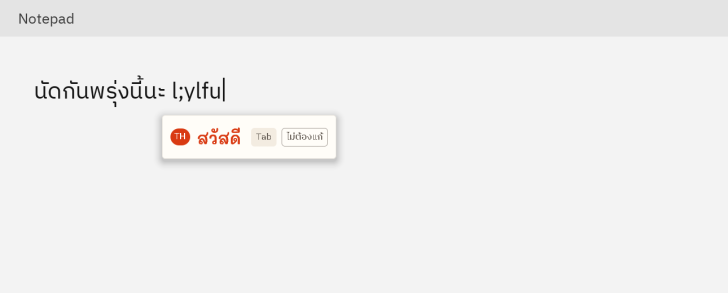
PhitPup (ผิดปุ๊บ โปรแกรมแก้พิมพ์ผิดภาษา ไทย-อังกฤษ บน Windows) : โปรแกรมผิดปุ๊บ (PhitPup) เป็นเครื่องมืออรรถประโยชน์ สำหรับ ระบบปฏิบัติการ (OS) อย่าง วินโดวส์ (Windows) 10 และ 11 พัฒนาขึ้นมาเพื่อแก้ปัญหาการพิมพ์ผิดอันเกิดจากการลืมสลับแป้น คีย์บอร์ด (Keyboard) ระหว่างภาษาไทย กับภาษาอังกฤษ เช่น การตั้งใจพิมพ์คำว่า "สวัสดี" แต่ลืมเปลี่ยนภาษาจนกลายเป็น "l;ylfu" หรือพิมพ์ "้ำสสน" แทนที่จะเป็น "hello" โดยโปรแกรมจะทำการตรวจจับ และสลับกลับมาเป็นคำที่ถูกต้องให้ทันที พร้อมเปลี่ยนเลย์เอาต์ภาษาของแป้นพิมพ์ตามให้อัตโนมัติ รองรับทั้งแป้นพิมพ์เกษมณี และปัตตะโชติ และลิงก์ #try ที่ระบุคือหน้าเว็บเดโมที่จำลองระบบให้ผู้ใช้ทดลองพิมพ์แก้ภาษาผ่าน เว็บเบราว์เซอร์ (Web Browser) ได้ก่อนดาวน์โหลดไปติดตั้งจริง
นอกจากปัญหาลืมเปลี่ยนภาษาแล้ว โปรแกรม ผิดปุ๊บ PhitPup ยังตรวจจับ และแก้ไขข้อผิดพลาดทางการพิมพ์รูปแบบอื่นได้อย่างครอบคลุม ได้แก่ การกดแป้นข้างเคียงพลาด หรือกดสลับตัวอักษร, การเรียงลำดับสระ และวรรณยุกต์ในภาษาไทยผิดรูปแบบที่มองด้วยตาเปล่าเหมือนถูกแต่ระบบค้นหาไม่เจอ เช่น การพิมพ์สระเอสองตัวแทนสระแอ หรือการพิมพ์นิคหิต กับสระอาแทนสระอำ รวมถึงการเผลอเปิด Caps Lock ค้างไว้จนขึ้นตัวพิมพ์เล็กใหญ่สลับกัน และการพิมพ์คำซ้ำซ้อนสองครั้ง
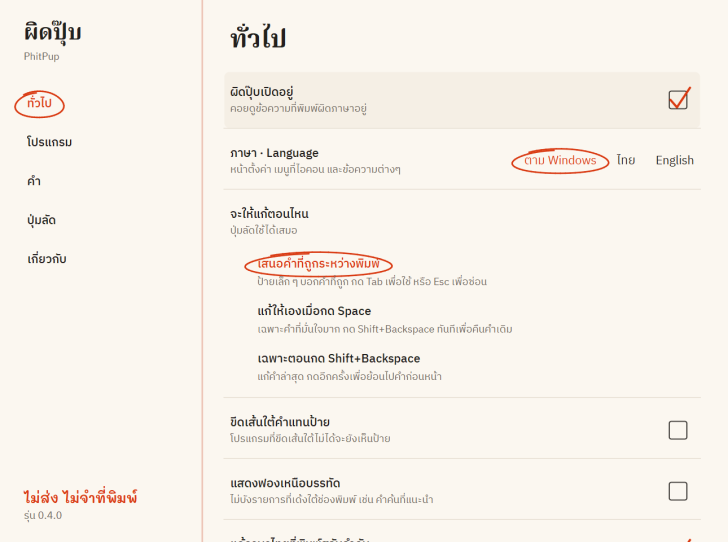
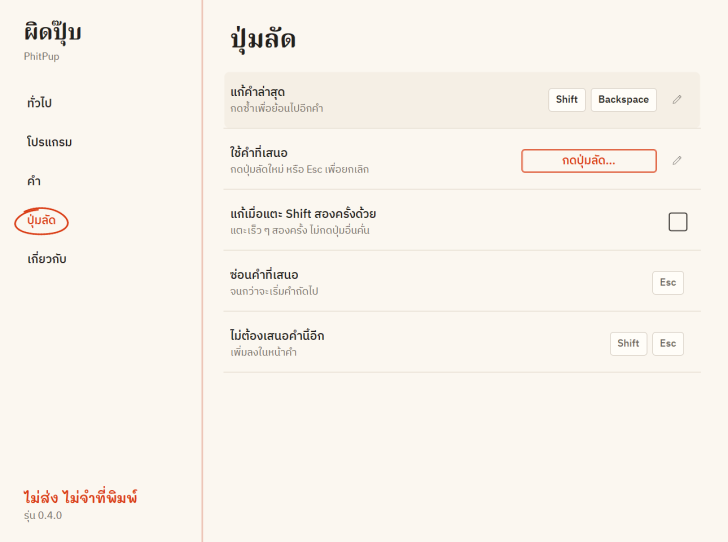
รูปแบบการทำงานของโปรแกรม ผิดปุ๊บ PhitPup เน้นให้ผู้ใช้เป็นผู้ควบคุม โดยโหมดเริ่มต้นคือ ระบบการแนะนำคำผ่านกล่องข้อความขนาดเล็ก หรือฟองคำใบ้ข้างเคอร์เซอร์ หากคำที่แนะนำถูกต้องสามารถกด "ปุ่ม Tab" เพื่อยอมรับคำนั้นได้ทันที หากเป็นคำที่ไม่ต้องการแก้ไขสามารถกดปุ่มลัด หรือคลิกเพื่อสั่งไม่ให้โปรแกรมทักคำนั้นอีก ทั้งยังมีปุ่มลัด Shift + Backspace สำหรับสั่งแก้คำล่าสุด หรือข้อความที่ไฮไลต์เลือกไว้ และสามารถตั้งค่าให้ทำงานแบบอัตโนมัติเมื่อเคาะ "ปุ่ม Spacebar" สำหรับคำที่ระบบมั่นใจสูงได้เช่นกัน
โดยโปรแกรม ผิดปุ๊บ PhitPup สามารถเลือกวิธีแก้ได้ 3 แบบ
จุดเด่นสำคัญอีกประการคือ ความปลอดภัย และความเป็นส่วนตัวระดับสูง โปรแกรม ผิดปุ๊บ PhitPup ออกแบบมาให้ประมวลผลภายในเครื่องทั้งหมด โดยไม่มีคำสั่งเชื่อมต่อ อินเทอร์เน็ต (Internet) อยู่ในตัวโปรแกรมหลัก ข้อมูลที่พิมพ์จะถูกพักไว้ใน หน่วยความจำหลัก (RAM) ชั่วคราวเฉพาะคำที่กำลังพิมพ์อยู่เท่านั้น ไม่มีการบันทึกประวัติการพิมพ์ลงเครื่อง หรือส่งออกภายนอก ตัวตรวจเช็กอัปเดตจะแยกเป็นไฟล์ภายนอก และทำงานเฉพาะเวลาที่ผู้ใช้สั่งตรวจสอบเท่านั้น ทั้งยังปิดการทำงานโดยอัตโนมัติเมื่ออยู่ในช่องกรอกรหัสผ่าน โปรแกรมจัดการรหัสผ่าน, รีโมตเดสก์ท็อป หรือการเปิดโปรแกรม และเกมในโหมดเต็มหน้าจอ
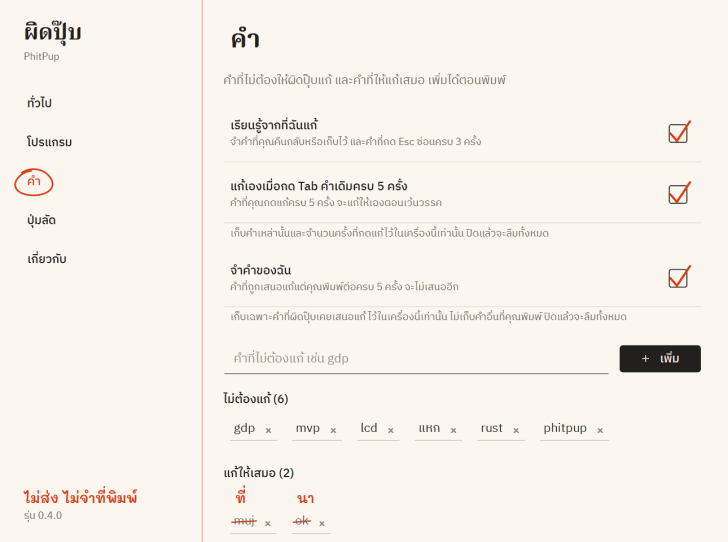
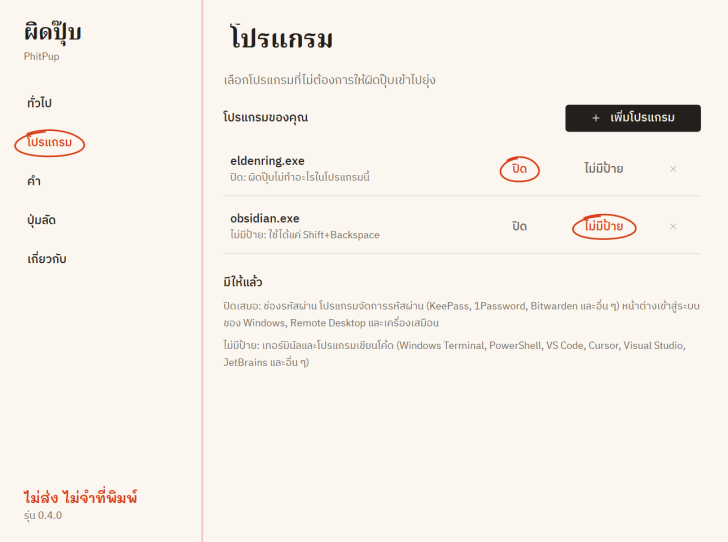
โปรแกรม ผิดปุ๊บ PhitPup เป็นซอฟต์แวร์ ฟรี (Free) ที่พัฒนาแบบ โอเพ่นซอร์ส (Open-Source) ที่อยู่ภายใต้เงื่อนไขการใช้งานแบบ GNU GENERAL PUBLIC LICENSE Version 3 ซึ่งหมายความว่าผู้ใช้สามารถใช้งาน, ดัดแปลง, แจกจ่าย และเข้าถึง โค้ดต้นฉบับ (Source Code) ได้อย่างเสรี ภายใต้เงื่อนไขที่กำหนด
หากต้องการค้นหาข้อมูลเพิ่มเติม สามารถติดต่อกับทางผู้พัฒนาโปรแกรมนี้ได้ผ่านทางช่องทางเว็บไซต์ (Website) : https://intity01.github.io/phitpup/# (ภาษาอังกฤษ) ได้เลย
PhitPup is a utility tool for the Windows 10 and 11 operating systems (OS) developed to solve typing mistakes caused by forgetting to switch the keyboard language between Thai and English. Examples include intending to type "สวัสดี" but forgetting to switch layouts, resulting in "l;ylfu," or typing "้ำสสน" instead of "hello." The software instantly detects and converts the text into the correct word while automatically switching the keyboard language layout accordingly. It supports both the Kedmanee and Pattachote keyboard layouts. The referenced #try link is an online interactive demo page that simulates the system, allowing users to test language auto-correction in their web browser before downloading and installing the actual program.
Beyond the forgotten-language-switch issue, PhitPup comprehensively detects and corrects various other typing errors. These include adjacent key mistypes, accidental letter transpositions, and improper Thai vowel and tone mark sequencing that looks visually correct to the naked eye but fails in search engines—such as typing two Sara E's (เ + เ) instead of Sara Ae (แ), or typing Nikhahit with Sara Aa ( ํ + า) instead of Sara Am (ำ). It also corrects inverted letter casing from leaving Caps Lock on, as well as unintentional duplicate words.
PhitPup's workflow is designed to keep the user in complete control. The default mode features a suggestion system via a small popup box or hint tooltip next to the cursor; if the suggested word is correct, simply press the Tab key to accept it immediately. If it is a word you do not wish to correct, you can use a hotkey or click to prevent the program from prompting that specific word again. It also features a Shift + Backspace shortcut to manually correct the most recent word or highlighted text, and it can be configured to automatically apply corrections upon pressing the Spacebar for words where the system has high confidence.




ความคิดเห็น (0)