











Thaiware Shop
จำหน่าย จัดหา ซอฟต์แวร์ลิขสิทธิ์ สำหรับองค์กร ฯลฯ

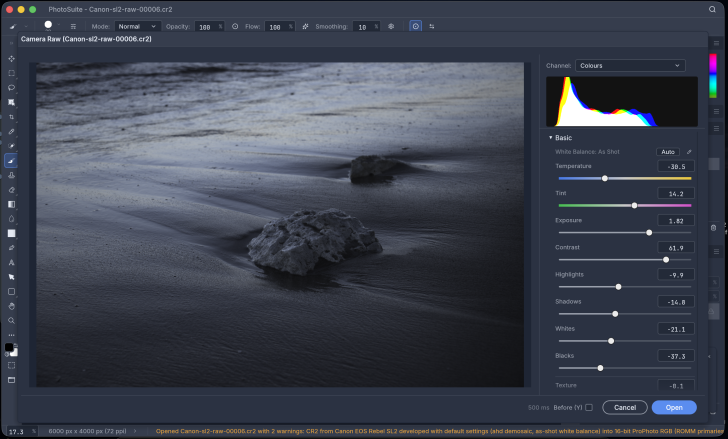
PhotoSplice (โปรแกรมแต่งรูปฟรี สไตล์ Photoshop) : โปรแกรม PhotoSplice เป็นโปรแกรมตกแต่ง และแก้ไขภาพกราฟิกแบบสองมิติ ทั้งภาพประเภทแรสเตอร์ (Raster) และเวกเตอร์ (Vector) ที่แจกจ่ายให้ใช้งานฟรีโดยไม่มีค่าลิขสิทธิ์ และไม่มีการเรียกเก็บค่าบริการรายเดือนใด ๆ
สำหรับวัตถุประสงค์หลักของการสร้างโปรแกรมนี้ขึ้นมา คือการเป็นทางเลือกทดแทน โปรแกรม Adobe Photoshop และเป็นทางเลือกทดแทน เว็บแอปพลิเคชัน (Web Application) อย่าง โปรแกรม Photopea โดยออกแบบ ประสบการณ์ของผู้ใช้งาน (UX) ให้ยึดตามความคุ้นเคยเดิมของผู้ใช้ (Photoshop Muscle Memory) ทำให้โครงสร้างเมนู, หน้าต่าง ส่วนติดต่อผู้ใช้งานแบบกราฟิก (GUI), แผงเครื่องมือ (Panel Tools), แถบตัวเลือก และคีย์ลัดต่าง ๆ จัดวางอยู่ในตำแหน่งเดียวกับ Photoshop แทบทั้งหมด เพื่อให้ผู้ใช้งานสามารถทำงานต่อได้ทันทีโดยไม่ต้องปรับตัวใหม่
ในด้านสถาปัตยกรรม และเทคโนโลยีเบื้องหลัง โปรแกรม PhotoSplice ถูกเขียนขึ้นด้วย ภาษา Rust ทั้งหมด ซึ่งช่วยให้โปรแกรมมีความปลอดภัยด้านการจัดการ หน่วยความจำหลัก (RAM), ทำงานได้รวดเร็ว และมีขนาดกะทัดรัด ตัวหน้าจอโปรแกรมสร้างขึ้นด้วย ไลบรารี (Library) egui ร่วมกับการเรนเดอร์กราฟิกผ่าน wgpu ส่งผลให้โปรแกรมสามารถดึงประสิทธิภาพการประมวลผลของหน่วยประมวลผล กราฟิกการ์ด (GPU) ด้วย GPU Acceleration บน ระบบปฏิบัติการ (OS) ต่าง ๆ ได้โดยตรง ไม่ว่าจะเป็น Metal บน แมคโอเอส (macOS), Vulkan บน วินโดวส์ (Windows) และ ลีนุกซ์ (Linux) หรือ DirectX บน Windows
อีกทั้งยังทำงานแบบเน้นออฟไลน์ (Offline-First) อย่างสมบูรณ์ ไม่จำเป็นต้องต่อ อินเทอร์เน็ต (Internet) และไม่มีการส่งรูปภาพขึ้น เซิร์ฟเวอร์ (Server) ภายนอก ช่วยรักษาความเป็นส่วนตัว และความปลอดภัยของไฟล์งานได้อย่างเต็มที่
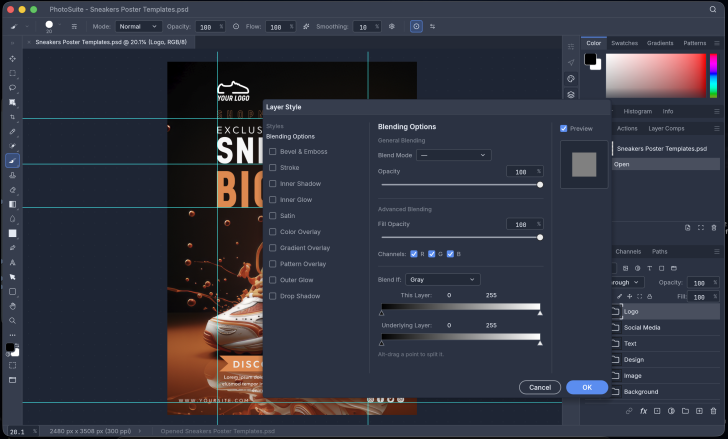
ในส่วนของฟังก์ชันการทำงาน โปรแกรม PhotoSplice มีจุดเด่นสำคัญอยู่ที่การรองรับไฟล์ตระกูล Adobe แบบ Native ทั้งไฟล์นามสกุล PSD และ PSB จึงสามารถเปิดไฟล์, แก้ไขโครงสร้างเลเยอร์ และบันทึกกลับไปทำงานร่วมกับซอฟต์แวร์อื่นได้อย่างราบรื่น ภายในโปรแกรมประกอบด้วยชุดเครื่องมือแต่งภาพระดับมืออาชีพครบวงจร เช่น ระบบเลเยอร์ขั้นสูงที่รองรับทั้งการจัดกลุ่มเลเยอร์ (Layer Groups), การมาร์กเลเยอร์ (Layer Masks), คลิปปิ้งมาร์ก (Clipping Masks), การใส่สไตล์ตกแต่งเลเยอร์ (Layer Styles), ไปจนถึงการใช้งาน Smart Objects และ Smart Filters
นอกจากนี้ ยังมีเครื่องมือวาดเส้นเวกเตอร์ และพาธ (Path Tools), แปรงระบายสี, เครื่องมือรีทัชภาพ และปรับแต่งเฉดสี, ระบบจัดการ ฟอนต์ (Font) และข้อความขั้นสูง, ระบบรองรับการเล่นชุดคำสั่งอัตโนมัติ (Action Playback), การเขียนสคริปต์ และ ปลั๊กอิน (Plug-in) ส่วนเสริม พร้อมทั้งรองรับการนำเข้า และส่งออกไฟล์ภาพมาตรฐานทั่วไป เช่น ไฟล์ PNG, JPEG, WebP, TIFF และ GIF
ระบบการเข้าใช้งานของ โปรแกรม PhotoSplice มีความยืดหยุ่นสูง โดยผู้ใช้งานสามารถเลือกดาวน์โหลดโปรแกรมเวอร์ชันเดสก์ท็อปมาติดตั้งบนเครื่องคอมพิวเตอร์ ซึ่งรองรับทั้ง Windows, macOS และ Linux หรือจะเลือกเปิดใช้งานทันทีผ่าน เว็บเบราว์เซอร์ (Web Browser) ในรูปแบบ Web Application ผ่าน WebAssembly โดยไม่ต้องติดตั้งลงเครื่อง จึงเหมาะสำหรับผู้ที่ต้องการโปรแกรมจัดการภาพ และกราฟิกที่มีเครื่องมือเทียบเคียงกับซอฟต์แวร์ระดับอาชีพ แต่ต้องการความคล่องตัว, ความเป็นส่วนตัว และไม่ต้องผูกมัดกับระบบจ่ายค่าสมาชิกระยะยาว
โปรแกรม PhotoSplice เป็นซอฟต์แวร์ ฟรี (Free) ที่พัฒนาแบบ โอเพ่นซอร์ส (Open-Source) ที่อยู่ภายใต้เงื่อนไขการใช้งานแบบ Apache-2.0 และ MIT Licenses ซึ่งหมายความว่าผู้ใช้สามารถใช้งาน, ดัดแปลง, แจกจ่าย และเข้าถึง โค้ดต้นฉบับ (Source Code) ได้อย่างเสรี ภายใต้เงื่อนไขที่กำหนด
หากต้องการค้นหาข้อมูลเพิ่มเติม สามารถติดต่อกับทางผู้พัฒนาโปรแกรมนี้ได้ผ่านทางช่องทางเว็บไซต์ (Website) : https://photosplice.com/#top (ภาษาอังกฤษ) ได้เลย
PhotoSplice is a 2D graphic design and photo editing software for both raster and vector images, distributed for free with no licensing fees or monthly subscriptions. The primary objective of its creation is to serve as an alternative to Adobe Photoshop and web applications like Photopea. The user experience (UX) is designed based on users' existing familiarity (Photoshop muscle memory), making the menu structure, graphical user interface (GUI) windows, tool panels, options bars, and keyboard shortcuts positioned almost exactly as they are in Photoshop, allowing users to continue working immediately without needing to readjust.
In terms of architecture and underlying technology, PhotoSplice is written entirely in Rust, which ensures memory management safety, fast performance, and a compact footprint. The program's interface is built using the egui library combined with graphics rendering via wgpu. This allows the software to directly leverage the processing power of the graphics card (GPU) through GPU Acceleration across various operating systems (OS), whether it is Metal on macOS, Vulkan on Windows and Linux, or DirectX on Windows. Additionally, it operates entirely on an offline-first approach, requiring no internet connection and sending no images to external servers, thereby fully maintaining the privacy and security of your project files.
Regarding its functionalities, a major highlight of PhotoSplice is its native support for Adobe file formats, including both PSD and PSB. This allows users to open files, edit layer structures, and save them back to work seamlessly with other software. The program includes a comprehensive suite of professional photo editing tools, such as an advanced layer system that supports Layer Groups, Layer Masks, Clipping Masks, and Layer Styles, as well as the use of Smart Objects and Smart Filters. Furthermore, it features vector drawing and Path Tools, paintbrushes, image retouching and color adjustment tools, an advanced font and text management




ความคิดเห็น (0)