





Thaiware Shop
จำหน่าย จัดหา ซอฟต์แวร์ลิขสิทธิ์ สำหรับองค์กร ฯลฯ

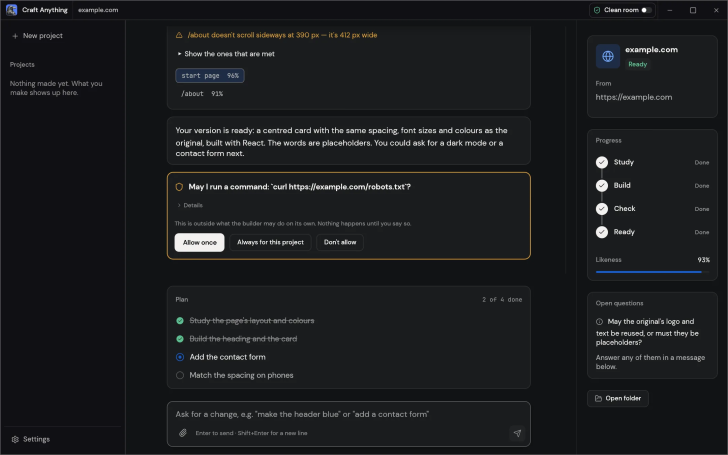
Craft Anything (โปรแกรมศึกษา แอป เว็บ ซอฟต์แวร์ แล้วสร้างใหม่ด้วย AI) : โปรแกรม Craft Anything เป็นโปรแกรมในชุดเครื่องมือตระกูล ArtCraft ที่พัฒนาขึ้นมาด้วย ภาษา Rust ทั้งหมด และมีการนำ ปัญญาประดิษฐ์ (AI) เข้ามาใช้ร่วมด้วย โดยมีเป้าหมายหลักในการเป็นเครื่องมือสำหรับ ศึกษา, วิเคราะห์การทำงานของซอฟต์แวร์, ทำ Reverse Engineering, Code Exploration) และสร้างซอฟต์แวร์ของตัวเองขึ้นมาใหม่ โดยทำงานร่วมกับ AI Coding Agent ภายใต้สถาปัตยกรรมที่ทำงานบนเครื่องของผู้ใช้โดยตรง
ในเชิงแนวคิด และการทำงาน โปรแกรม Craft Anything ถูกสร้างขึ้นมาเพื่อให้ผู้พัฒนา และผู้ใช้งานสามารถแกะรอย และทำความเข้าใจโครงสร้างของเว็บไซต์, แอปพลิเคชัน, เกม หรือไฟล์ต่าง ๆ ได้อย่างเป็นระบบ ตัวโปรแกรมมีเครื่องมือสำหรับตรวจสอบ (Inspect) พร้อมเก็บหลักฐานอ้างอิงเชิงลึกว่าแต่ละองค์ประกอบทำงานอย่างไร ? รวมถึงมีเครื่องมือแบบ Clean-room ที่ช่วยให้สามารถศึกษาพฤติกรรมของซอฟต์แวร์ต้นแบบโดยไม่ละเมิดลิขสิทธิ์โค้ด เพื่อนำแนวคิด, ฟังก์ชัน และสถาปัตยกรรมนั้นมาสร้างเวอร์ชันใหม่ขึ้นมาเอง
ในการสร้างโปรแกรมใหม่ ผู้ใช้สามารถป้อนคำอธิบายสิ่งที่ต้องการ จากนั้นโปรแกรม Craft Anything จะสั่งงาน Agent เพื่อเขียนโค้ด และรันโปรเจกต์ พร้อมทั้งมีระบบเปรียบเทียบผลลัพธ์ระหว่างโปรเจกต์ใหม่ กับต้นฉบับอย่างละเอียด ทั้งในแง่หน้าตา และฟังก์ชันการทำงาน เพื่อตรวจสอบข้อผิดพลาด และสั่งปรับแต่งเพิ่มเติมได้ในที่เดียว ด้านความปลอดภัย ผู้ใช้ยังเป็นผู้ถือสิทธิ์ควบคุมสูงสุด โดยทุกคำสั่งที่อยู่นอกกรอบกฎเกณฑ์ที่กำหนดไว้จะต้องผ่านการอนุมัติก่อนเสมอ
ในแง่สถาปัตยกรรมทางเทคนิค โปรแกรม Craft Anything ถูกคอมไพล์จากภาษา Rust ให้เป็นโปรแกรมสำหรับ Desktop โดยตรงสำหรับ ระบบปฏิบัติการ (OS) ยอดนิยมอย่าง แมคโอเอส (macOS), วินโดวส์ (Windows) และ ลีนุกซ์ (Linux) โดยไม่พึ่งพา เฟรมเวิร์ก (Framework) Electron หรือ Web View ทำให้มีขนาดไฟล์เล็ก และใช้ทรัพยากรเครื่องน้อยมาก นอกจากนี้ยังรองรับการทำงานผ่าน ส่วนติดต่อผู้ใช้แบบบรรทัดคำสั่ง (CLI), หน้าต่าง ส่วนติดต่อผู้ใช้งานแบบกราฟิก (GUI), เว็บเบราว์เซอร์ (Web Browser) WebAssembly (Wasm) รวมถึงรองรับ โปรโตคอล MCP เพื่อให้ AI Agent ตัวอื่นสามารถเชื่อมต่อ และสั่งการทำงานของโปรแกรมได้แบบอัตโนมัติ
โปรแกรม Craft Anything เป็นซอฟต์แวร์ ฟรี (Free) ที่พัฒนาแบบ โอเพ่นซอร์ส (Open-Source) ที่อยู่ภายใต้เงื่อนไขการใช้งานแบบ Apache-2.0 และ MIT Licenses ซึ่งหมายความว่าผู้ใช้สามารถใช้งาน, ดัดแปลง, แจกจ่าย และเข้าถึง โค้ดต้นฉบับ (Source Code) ได้อย่างเสรี ภายใต้เงื่อนไขที่กำหนด
หากต้องการค้นหาข้อมูลเพิ่มเติม สามารถติดต่อกับทางผู้พัฒนาโปรแกรมนี้ได้ผ่านทางช่องทางเว็บไซต์ (Website) : https://getartcraft.com/apps/craft-anything (ภาษาอังกฤษ) ได้เลย
Craft Anything is an application within the ArtCraft tool suite developed entirely in Rust, designed primarily as a tool for studying, analyzing software behavior, reverse engineering, code exploration, and creating custom software by collaborating with AI Coding Agents under a local-first architecture running directly on the user's machine.
In terms of concept and workflow, Craft Anything was built to enable developers and users to systematically trace and understand the structures of websites, applications, games, or various file types. It features inspection tools that capture deep reference evidence of how each component operates, alongside clean-room capabilities that allow users to study the behavior of original software without copyright infringement, making it possible to adopt those concepts, functions, and architectures into newly built versions.
When creating new software, users can provide a description of their requirements, and Craft Anything directs the AI Agent to write code and run the project. It also provides a side-by-side comparison system between the new project and the original reference, covering both visual presentation and functional behavior, to verify errors and request iterative adjustments all in one place. Regarding security, users maintain complete control, as any operations outside predefined rules strictly require prior user approval.
From a technical architecture standpoint, Craft Anything compiles directly from Rust into native desktop binaries for macOS, Windows, and Linux without relying on Electron or Web Views, resulting in minimal binary sizes and exceptionally low resource consumption. Additionally, it supports execution via a Command-Line Interface (CLI), a graphical Desktop UI (GUI), and web browsers through WebAssembly (Wasm), alongside native Model Context Protocol (MCP) server support that allows external AI agents to connect and automate its operations directly.




ความคิดเห็น (0)