











Thaiware Shop
จำหน่าย จัดหา ซอฟต์แวร์ลิขสิทธิ์ สำหรับองค์กร ฯลฯ

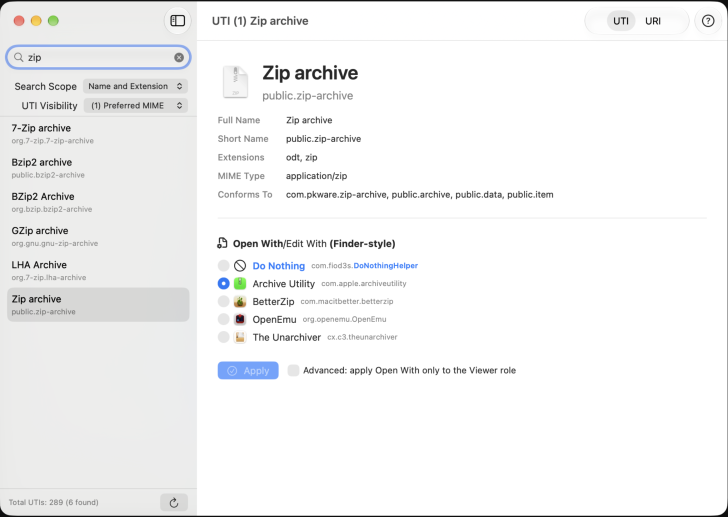
UTIdefaults (โปรแกรมตั้งค่าแอปเริ่มต้นเปิดไฟล์บน Mac) : โปรแกรม UTIdefaults เป็นโปรแกรมเครื่องมืออรรถประโยชน์สำหรับ ระบบปฏิบัติการ (OS) ยอดนิยมอย่าง แมคโอเอส (macOS) หน้าที่หลักของโปรแกรมนี้คือ การเปิดให้ผู้ใช้งานสามารถตั้งค่า และเลือกแอปพลิเคชันเริ่มต้น (Default Application) ที่จะใช้เปิด หรือแก้ไขไฟล์ประเภทต่าง ๆ ได้อย่างอิสระ และละเอียดมากยิ่งขึ้น โดยตัวโปรแกรม UTIdefault จะทำงานผ่านการจัดการระบบ UTI (Uniform Type Identifier) ซึ่งเป็นมาตรฐานที่ Apple ใช้ในการระบุประเภท และชนิดของไฟล์ต่าง ๆ ภายในเครื่อง เช่น ไฟล์ข้อความ TXT, ไฟล์วิดีโอ MP4 หรือ .ไฟล์รูปภาพ JPEG
โปรแกรม UTIdefaults ถูกพัฒนาขึ้นมาเพื่ออุดช่องโหว่ และทดแทนโปรแกรมจัดการแอปพลิเคชันเริ่มต้นในอดีตที่หยุดการพัฒนา และไม่ได้รับการอัปเดตมานานหลายปี อย่างเช่น โปรแกรม RCDefaultApp รวม หรือ SwiftDefaultApps ที่ทำงานบนชิป Apple Silicon รุ่นใหม่ ๆ ได้ไม่สมบูรณ์นัก ผู้พัฒนาจึงได้เขียนโปรแกรม UTIdefaults ขึ้นมาใหม่ทั้งหมดด้วย SwiftUI เพื่อให้เป็นโปรแกรมที่ทันสมัย รองรับการทำงานแบบ Native อย่างแท้จริง โดยมีการใช้สถาปัตยกรรมแบบ Multithreading เพื่อให้ตัวโปรแกรมทำงานได้รวดเร็ว, ตอบสนองได้ไว และมีหน้าตา ส่วนติดต่อผู้ใช้งานแบบกราฟิก (GUI) ที่กลมกลืนไปกับดีไซน์ของ macOS ในปัจจุบัน
การทำงานของโปรแกรม UTIdefaults ออกแบบมาให้มีความยืดหยุ่นสูง โดยผู้ใช้สามารถเลือกโหมดมาตรฐานที่ทำงานคล้ายคลึงกับ เมนูคลิกขวา (Contect Menu) แล้วเลือก Open With ในหน้าต่าง Finder ปกติ หรือจะปรับเป็นโหมดขั้นสูง (Advanced Mode) ที่อนุญาตให้ผู้ใช้แยกการตั้งค่าระหว่างโปรแกรมที่จะใช้แค่ "เปิดดู" (Viewer) ออกจากโปรแกรมที่จะใช้ "แก้ไข" (Editor) ได้อย่างชัดเจน นอกจากนี้ ยังมีฟีเจอร์ค้นหาประเภทไฟล์ที่ฉลาด และรวดเร็ว รวมถึงมีคำสั่ง "Do Nothing" สำหรับตั้งค่าไม่ให้ระบบปฏิบัติการตอบสนองต่อการดับเบิลคลิกไฟล์บางประเภทได้ด้วย ข้อควรระวังในการใช้งานคือ ตัวโปรแกรมจะสามารถตั้งค่าได้เฉพาะนามสกุลไฟล์ที่มีการประกาศมาตรฐาน UTI ลงทะเบียนไว้กับระบบ macOS โดยแอปพลิเคชันต่าง ๆ ที่ติดตั้งไว้แล้วเท่านั้น
ในส่วนของความต้องการระบบ โปรแกรม UTIdefaults ถูกสร้างมาเป็นแพ็กเกจแบบ Universal Binary ทำให้ใช้งานได้อย่างลื่นไหลทั้งบนเครื่อง Mac ที่ใช้ชิป Intel รุ่นเก่า และชิปตระกูล Apple Silicon รุ่นใหม่ แต่มีเงื่อนไขสำคัญคือผู้ใช้งานจะต้องอัปเดตระบบปฏิบัติการเป็น macOS 15 Sequoia (เวอร์ชัน 15.6 ขึ้นไป) จึงจะสามารถใช้งานชุดคำสั่ง ส่วนต่อประสานโปรแกรมประยุกต์ (API) ใหม่ ๆ ที่โปรแกรมเรียกใช้ได้
กำหนดแอปพลิเคชันหลักในการเปิดหรือแก้ไขไฟล์ตามมาตรฐาน Uniform Type Identifier (UTI) ของ Apple ซึ่งครอบคลุมประเภทไฟล์อย่างละเอียด (เช่น .txt, .jpg, .mp4) แทนที่เครื่องมือรุ่นเก่าอย่าง RCDefaultApp และ SwiftDefaultApps
มีตัวเลือกตั้งค่าให้ระบบไม่ตอบสนองใด ๆ เมื่อดับเบิลคลิกเปิดไฟล์ประเภทที่ระบุ โดยทำงานผ่าน Signed Helper App ที่มีความปลอดภัย และเข้ากันได้กับระบบ
โปรแกรม UTIdefaults เป็นซอฟต์แวร์ ฟรี (Free) ที่ผู้พัฒนาปล่อยให้ดาวน์โหลดไปใช้งานได้ฟรี โดยสามารถกำหนดราคาได้เอง หรือจะใส่ราคาแค่ 0 บาท ก็ได้เช่นกัน
หากต้องการค้นหาข้อมูลเพิ่มเติม สามารถติดต่อกับทางผู้พัฒนาโปรแกรมนี้ได้ผ่านทางช่องทางเว็บไซต์ (Website) : https://fiod3s.itch.io/utidefaults (ภาษาอังกฤษ) ได้เลย
UTIdefaults is a utility program for the macOS operating system (OS). Its primary function is to allow users to freely and precisely configure and select default applications for opening or editing various file types. UTIdefaults operates by managing the Uniform Type Identifier (UTI) system Apple's standard for identifying data types and files within the operating system, such as .txt text files, .mp4 video files, or .jpeg image files.
UTIdefaults was developed to fill the gap and replace legacy default-app management utilities that were discontinued or left unmaintained for years, such as RCDefaultApp or SwiftDefaultApps, the latter of which lacks full native support for modern Apple Silicon chips. Consequently, the developer rewrote UTIdefaults from scratch using SwiftUI to deliver a modern, fully native app. It employs a multithreaded architecture for fast and responsive performance, paired with a graphical user interface (GUI) that seamlessly blends with the modern macOS design aesthetic.
The functionality of UTIdefaults is designed with high flexibility. Users can choose a standard mode that mirrors the behavior of Finder's right-click context menu under "Open With," or switch to an Advanced Mode that lets users independently configure separate applications for "Viewer" and "Editor" roles. Additionally, it features an intelligent and fast file-type search, as well as a "Do Nothing" option to prevent the OS from reacting when double-clicking specific file types. A key consideration when using the app is that it can only configure file extensions that have been declared and registered as UTIs in macOS by currently installed applications.
Regarding system requirements, UTIdefaults is distributed as a Universal Binary, allowing it to run smoothly on both legacy Intel-based Macs and modern Apple Silicon Macs. However, an essential requirement is that users must be running macOS 15 Sequoia (version 15.6 or later) to support the modern Application Programming Interfaces (APIs) utilized by the application.





ความคิดเห็น (0)