








Thaiware Shop
จำหน่าย จัดหา ซอฟต์แวร์ลิขสิทธิ์ สำหรับองค์กร ฯลฯ


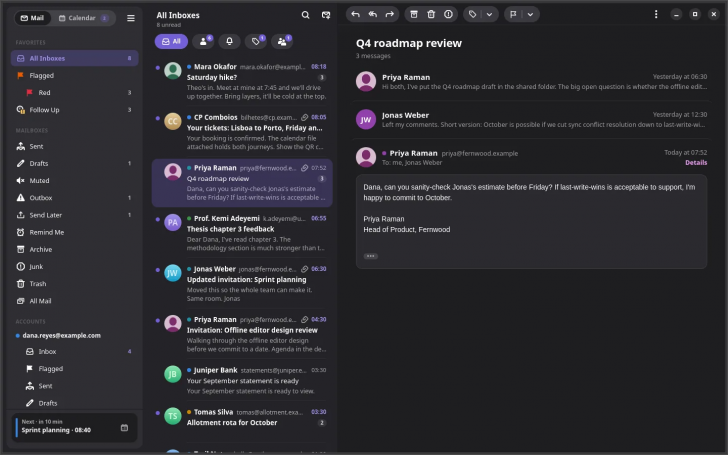
Penguin Mail (โปรแกรมอีเมล และปฏิทิน Linux รองรับ GMail MS IMAP/SMTP) : Penguin Mail เป็นโปรแกรมรับ-ส่งอีเมล และจัดการปฏิทิน สำหรับ ระบบปฏิบัติการ (OS) ลีนุกซ์ (Linux) โดยเฉพาะ พัฒนาขึ้นด้วย ภาษา Rust และออกแบบ ส่วนต่อประสานกับผู้ใช้ (UI) ด้วย GTK4 ร่วมกับ libadwaita ทำให้มีหน้าตาที่สวยงาม, ทันสมัย และเข้ากันได้ดีกับสภาพแวดล้อมเดสก์ท็อปอย่าง GNOME รวมถึงเดสก์ท็อป Linux รูปแบบอื่น
Penguin Mail ถูกออกแบบมาเพื่อรวมการทำงานของอีเมล และปฏิทินไว้ในที่เดียว รองรับบัญชีผู้ใช้หลากหลายประเภท ไม่ว่าจะเป็น Gmail, Outlook, Microsoft 365 ฯลฯ รวมถึง โปรโตคอล (Protocol) มาตรฐานอย่าง IMAP, POP3, SMTP, CalDAV และ CardDAV สำหรับผู้ให้บริการรายอื่นอย่าง Fastmail, iCloud หรือ Yahoo โดยการเชื่อมต่อกับ Google และ Microsoft จะเป็นการติดต่อโดยตรงกับ เซิร์ฟเวอร์ (Server) หลักผ่าน ส่วนต่อประสานโปรแกรมประยุกต์ (API) เช่น Microsoft Graph ทำให้มั่นใจได้ว่าข้อมูลอีเมลจะไม่ผ่านเซิร์ฟเวอร์คนกลาง

ด้านการใช้งานอีเมล โปรแกรม Penguin Mail ให้ความสำคัญกับความสะดวกในการอ่าน และการจัดการ โดยมีกล่องข้อความรวมที่แสดงอีเมลจากทุกบัญชีพร้อมกัน หรือจะแยกดูทีละบัญชีก็ได้ มีระบบจัดหมวดหมู่อีเมลเหมือน Gmail, รองรับการแสดงผลอีเมลแบบแยกตามการสนทนา และตัดข้อความอ้างอิง หรือลายเซ็นลงเพื่อความสบายตา นอกจากนี้ยังมีระบบความปลอดภัยขั้นสูงโดยการแสดงผลอีเมล HTML ภายใน Sandbox ที่ปิดการทำงานของ JavaScript และบล็อกการโหลดรูปภาพจากภายนอกล่วงหน้าเพื่อป้องกันการติดตาม
สำหรับการเขียน และการจัดการอีเมล มีเครื่องมือช่วยอำนวยความสะดวกครบครัน ตั้งแต่หน้าจัดทำข้อความที่รองรับการเขียนด้วยตัวหนา, ตัวเอียง หรือรูปแบบ Markdown, การบันทึกฉบับร่าง (Draft) ตรงไปยังเซิร์ฟเวอร์เพื่อความต่อเนื่องในการใช้งานบนอุปกรณ์อื่น, ระบบยกเลิกการส่งชั่วคราว, การตั้งเวลาส่งอีเมล และกล่องส่งออก ที่ช่วยเก็บข้อความไว้เมื่อไม่มีสัญญาณอินเทอร์เน็ตแล้วลองส่งใหม่อัตโนมัติเมื่อกลับมาออนไลน์ นอกจากนี้ ยังมีฟังก์ชันจัดระดับความสำคัญ เช่น การติดธงสีต่าง ๆ แบบ Apple Mail, ระบบติดตามผู้ติดต่อสำคัญ, กล่องข้อความอัจฉริยะ, ระบบเตือนความจำ และฟังก์ชันยกเลิกการรับข่าวสาร
ในส่วนของปฏิทิน และผู้ติดต่อ โปรแกรม Penguin Mai มีแท็บปฏิทินในตัว สามารถแสดงกำหนดการรายวัน รายสัปดาห์ รายเดือน หรือรายการเหตุการณ์ รองรับการตอบรับคำเชิญเข้าร่วมประชุมได้โดยตรงจากอีเมล พร้อมระบบค้นหาเหตุการณ์ข้ามบัญชี และเชื่อมโยงรายชื่อผู้ติดต่อผ่าน CardDAV
ความปลอดภัยและความเป็นส่วนตัวเป็นอีกหนึ่ง จุดเด่นสำคัญ โปรแกรมรองรับการเข้ารหัส และลงนามดิจิทัลมาตรฐาน OpenPGP และ S/MIME โดยทำงานร่วมกับ GnuPG ของระบบโดยตรง ทำให้โปรแกรมไม่จำเป็นต้องเก็บกุญแจรหัส หรือรหัสผ่านไว้เอง นอกจากนี้ยังมีฟังก์ชัน Hide My Email สำหรับสร้างนามแฝงอีเมลเพื่อป้องกันสแปม และการตั้งค่ากฎการกรองอีเมล หรือการตอบกลับอัตโนมัติที่ซิงค์ กับเซิร์ฟเวอร์โดยตรง
โปรแกรม Penguin Mail ยังมาพร้อมกับระบบผู้ช่วย ปัญญาประดิษฐ์ (AI) อัจฉริยะ (Assistant Pane) ที่เลือกเปิด หรือปิดได้ ผู้ใช้สามารถเชื่อมต่อเข้ากับโมเดลประมวลผลภายในเครื่อง เช่น LM Studio, Ollama หรือใช้ API Key จากบริการภายนอก เช่น Anthropic Claude หรือ OpenAI โดย AI สามารถช่วยสรุปเนื้อหาอีเมล, ร่างข้อความตอบกลับ, ค้นหาเวลาว่างในปฏิทิน, ค้นหารายชื่อผู้ติดต่อ หรือประมวลผลไฟล์แนบ โดยจะแสดงขั้นตอนการทำงาน และสอบถามการยืนยันจากผู้ใช้ก่อนดำเนินการส่งอีเมลหรือแก้ไขข้อมูลเสมอ
ในด้านประสิทธิภาพ และการทำงานบนเดสก์ท็อป โปรแกรมกินทรัพยากรเครื่องต่ำมาก โดยขณะซ่อนตัวอยู่ใน System Tray จะใช้ หน่วยความจำหลัก (RAM) เพียงประมาณ 55 MB และมีระบบคืนแรมหลังจากปิดหน้าต่าง พร้อมรองรับระบบการแจ้งเตือนของ Linux คีย์ลัดแบบเดียวกับ Apple Mail หรือ Gmail และมีแพ็กเกจติดตั้งรองรับ Linux หลากหลายดิสโทร ทั้ง .deb, .rpm, Arch Linux และ Snap
ภาพและไฟล์แนบ: ลากวางภาพลงในข้อความได้ตรงๆ แสดงขนาดไฟล์แนบ และมีระบบเดารายชื่อผู้รับ
โปรแกรม Penguin Mail เป็นซอฟต์แวร์ ฟรี (Free) ที่พัฒนาแบบ โอเพ่นซอร์ส (Open-Source) ที่อยู่ภายใต้เงื่อนไขการใช้งานแบบ GPL-3.0 License ซึ่งหมายความว่าผู้ใช้สามารถใช้งาน, ดัดแปลง, แจกจ่าย และเข้าถึง โค้ดต้นฉบับ (Source Code) ได้อย่างเสรี ภายใต้เงื่อนไขที่กำหนด
หากต้องการค้นหาข้อมูลเพิ่มเติม สามารถติดต่อกับทางผู้พัฒนาโปรแกรมนี้ได้ผ่านทางช่องทางเว็บไซต์ (Website) : https://penguin-mail.com/ (ภาษาอังกฤษ) ได้เลย
Penguin Mail is an email client and calendar manager built specifically for the Linux operating system. Developed in Rust and featuring a user interface designed with GTK4 and libadwaita, it offers a sleek, modern look that integrates seamlessly with desktop environments like GNOME as well as other Linux distributions.
Designed as an all-in-one workspace, Penguin Mail supports a wide range of account types, including Gmail, Outlook, and Microsoft 365, along with standard protocols such as IMAP, POP3, SMTP, CalDAV, and CardDAV for providers like Fastmail, iCloud, or Yahoo. Connections to Google and Microsoft are handled directly through primary server APIs, such as Microsoft Graph, ensuring that your email data never passes through intermediary third-party servers.
When it comes to email management, Penguin Mail prioritizes readability and convenience. It features a Unified Inbox that displays messages from all accounts together, while still allowing you to view accounts individually. The app incorporates Gmail-style email categorization, supports threaded conversation views, and neatly collapses quoted text or signatures for a cleaner reading experience. Security is also a core focus, as HTML emails are rendered within a sandbox with JavaScript disabled and remote image loading blocked by default to prevent tracking.
For composing and organizing emails, the app provides a full suite of convenient tools. Its composer supports rich text styling like bold and italic formatting, as well as Markdown syntax. Drafts sync directly to the server so you can resume writing on other devices, while additional features include Undo Send, scheduled sending, and an Outbox that queues messages during network outages and automatically resends them once you are back online. Organization features include multi-colored flags similar to Apple Mail, VIP contact tracking, Smart Mailboxes, reminders, and a one-click unsubscribe function.
The built-in calendar and contacts tab allows you to view schedules by day, week, month, or as an agenda view. You can respond to event invitations directly from emails, search for events across all connected accounts, and sync contacts seamlessly using CardDAV.
Security and privacy are major highlights of the application. Penguin Mail supports OpenPGP and S/MIME digital signing and encryption by integrating directly with the system's GnuPG, meaning the app itself never stores your encryption keys or passphrases. It also features a "Hide My Email" tool to create email aliases against spam, as well as server-side mail filtering rules and automated out-of-office replies.
Additionally, Penguin Mail comes equipped with an optional AI Assistant Pane. Users can connect it to local models using LM Studio or Ollama, or use API keys for external services like Anthropic Claude and OpenAI. The AI assistant can summarize email threads, draft replies, check calendar availability, look up contacts, and process attachments. To keep you in control, it always displays its step-by-step reasoning and prompts for user confirmation before sending emails or modifying data.
In terms of performance, Penguin Mail is remarkably lightweight. While minimized to the System Tray, it consumes only about 55 MB of RAM and automatically reclaims memory used by the main window once closed. It fully supports Linux desktop notifications, includes keyboard shortcuts familiar to Apple Mail and Gmail users, and is available in multiple package formats across Linux distributions, including .deb, .rpm, Arch Linux, and Snap.





ความคิดเห็น (0)