






Thaiware Shop
จำหน่าย จัดหา ซอฟต์แวร์ลิขสิทธิ์ สำหรับองค์กร ฯลฯ



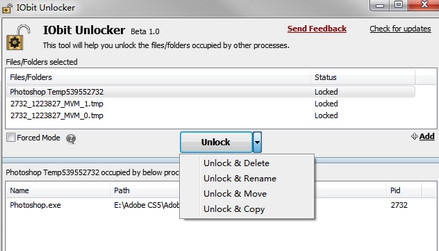
IObit Unlocker (โปรแกรมลบไฟล์ที่ลบไม่ได้ ย้ายไฟล์ Copy ไฟล์ ที่ไม่ได้) : เจ้าตัวนี้มีนามว่า โปรแกรม Unlocker เป็น โปรแกรมลบไฟล์ที่ลบไม่ได้ ลบเท่าไหร่ก็ลบไม่ได้สักที หรือ การแก้ปัญหา Access Denied เพราะเชื่อว่า บางเหตุการณ์เชื่อว่าท่านคงเจอลักษณะที่ว่า ต้องการจะ ย้ายไฟล์ (Move File) ลบไฟล์ไม่ได้ (Delete File) Copy ไฟล์ (Copy File) หรือแม้กระทั่ง การเปลี่ยนชื่อไฟล์ (Rename File) โดยเจ้า โปรแกรมระบบปฏิบัติการสุดฉลาด (เกินไป) อย่าง Windows มันมักจะชอบขึ้นข้อความมาฟ้อง แจ้งเตือน ประมาณว่า
ด้วยเหตุการณ์เหล่านี้ หนทางที่จะทำได้คือ บางทีเราต้อง ปิดโปรแกรมที่เปิดอยู่ทั้งหมด หรือบางทีอาจถึงขั้นจะต้อง รีสตาร์ท (Restart / Reboot) เครื่องใหม่เลย เพื่อที่จะลบไฟล์ๆ เดียว ซึ่งบางทีมันไม่จำเป็น เกิดเหตุ ดังนั้น โปรแกรมลบไฟล์ที่ลบไม่ได้ ตัวนี้ สามารถช่วยท่านในการปลดล๊อค (Unlocker) การป้องกันเหล่านี้ของ Windows ได้ แจกฟรี ครับ ...
Note : สำหรับ โปรแกรมลบไฟล์ IObit Unlocker โปรแกรมนี้ ทางผู้พัฒนา โปรแกรม (Program Developer) เขาได้แจกให้ ทุกคนได้นำไปใช้กันฟรีๆ (FREE) โดยคุณไม่ต้องเสียค่าใช้จ่ายใดๆ ทั้งสิ้น
นอกจากนี้คุณสามารถที่จะติดต่อกับทางผู้พัฒนา โปรแกรมนี้ได้ทางช่องทางอีเมล : support@iobit.com (ภาษาอังกฤษ) ได้ทันทีเลย
This program is called "IObit Unlocker". It is a light-weighted yet powerful tool designed to fix the "Cannot Delete" or "Access Denied" problems. It can "Forced" terminate all related processes that prevent you from deleting or accessing files / folders that you need to. It also provides several useful options to make your work easier, like "Unlock & Delete", "Unlock & Rename", "Unlock & Move", and "Unlock & Copy". You wouldn't be annoyed any more by messages like "Cannot delete file: Access is denied", "The file is in use by another program or user", or "There has been a sharing violation"!





ความคิดเห็น (10)
ขอบคุณครับ
ขอบคุณครับ