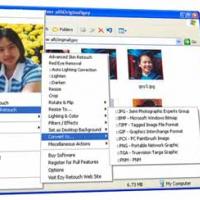
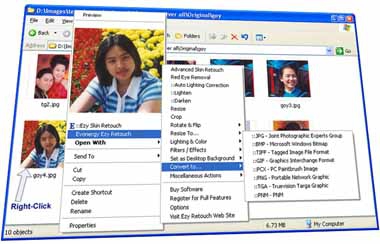
Evonergy Ezy Retouch (โปรแกรม ทำให้ภาพถ่าย สวยงามยิ่งขึ้น)�: Ezy Retouch เป็นโปรแกรมที่ใช้ในการตกแต่งภาพ โดยทำให้ภาพใบหน้าสวยขึ้น โดยมีการใช้งานที่ง่ายมาก เพียงแค่เปิด Windows Explorer, คลิกเมาส์ขวาที่รูป, เลือก ::Ezy Skin Retouch คุณก็จะได้รูปที่สวยมากขึ้นกว่าเดิมในเวลาไม่กี่วินาที ...
Note : โปรแกรมนี้ มีคุณสมบัติเป็น
Shareware นะครับ ทางผู้พัฒนา โปรแกรม (Program Developer) เขาได้ท่านได้นำไปใช้กันก่อน
ฟรี !!! แต่มีข้อแม้ว่า จะมี Watermark แสดงชื่อของโปรแกรมนี้ติดอยู่ที่รูป ทุกรูปที่ทำครับ หาก ถ้าท่านต้องการจะใช้ต่อกันในแบบตัวเต็มๆ (Full Version) แบบไม่มี Watermark ละก็ท่านจะต้อง เสียค่าลงทะเบียน (Register) เป็นเงินจำนวน
639.00 บาท ครับ .. โดยท่านสามารถที่จะติดต่อกับทางผู้พัฒนา โปรแกรมนี้ได้ทาง
E-Mail : support@evonergy.com (ภาษาไทย, ภาษาอังกฤษ) นะครับผม ...
English Description : Evonergy Ezy Retouch is fast, stable and easy to use� image viewer and editor with a skin smoothing feature. It has useful features for photo viewing and editing, including , skin smoothing, red eye removal, rotate, resize, crop, color adjustment, file converting, lighting correction, viewing using mouse wheel, filter effects and wallpaper with easy to use by right-click on image(s). Just imagine - you came back from a nice trip, with a lot of photos in your digital camera. You uploaded images from your camera to a computer, then in the Windows Explorer, you selects all images, right click and chooses� ::Ezy Skin Retouch. A few second later, you are enjoying good looking face and skin photos from your trip. It supports major graphic file format (BMP, GIF, JPEG, PNG, ICO, CUR, TIFF, TGA, PCX, JPEG 2000, JPC, RAS, PNM).
















ความคิดเห็น (3)