






Thaiware Shop
จำหน่าย จัดหา ซอฟต์แวร์ลิขสิทธิ์ สำหรับองค์กร ฯลฯ



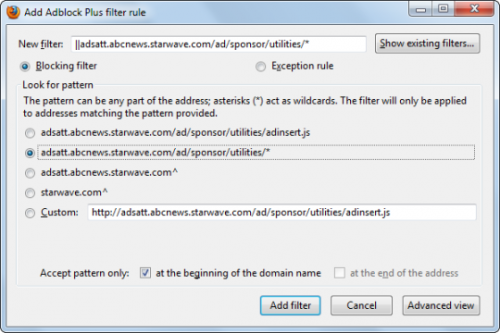
Adblock Plus (โปรแกรม บล็อก ป้องกันไวรัสโฆษณา บนเว็บเบราว์เซอร์) : สำหรับโปรแกรมนี้ มีชื่อว่า โปรแกรม Adblock Plus มันเป็นโปรแกรมบล็อกป็อปอัพ (Popup Block) ช่วยป้องกันป็อปอัพตามเว็บไซต์ต่างๆ ไม่ว่าจะเป็นพวก แอดแวร์ (Adware) มัลแวร์ (Malware) สปายแวร์ (Spyware) ที่อาจไม่ปลอดภัยและเสี่ยงจากแฮกเกอร์ต่างๆ ที่เข้ามาขโมยข้อมูล หรือ ป็อปอัพเหล่านั้นสร้างความรำคาญให้กับคุณ ขณะทำงาน หรือ ท่องเว็บไซต์
เจ้าโปรแกรม Adblock Plus นี้ทำหน้าที่คล้าย โปรแกรมสแกนไวรัส ที่คอยปกป้องคอมของคุณให้ปลอดภัยจากเว็บไซต์บางอันที่มีความเสี่ยง โดยมันรองรับกับหลายเว็บบราวเซอร์เลย ไม่ว่าจะเป็น Internet Explorer, Google Chrome, Mozila FireFox, Opera, Safari แม้แต่ใน Android อีกด้วย และมันยังรองรับการทำงานบน Windows NT/ 98/ Me/ 2000/ XP/ 2003/ Vista/ 7/ 8 และ Windows 10 ทั้งแบบ 32Bit และ 64Bit ที่สำคัญดาวน์โหลดฟรี
Program Features (คุณสมบัติและความสามารถของโปรแกรม Adblock Plus เพิ่มเติม)
Note : โปรแกรม Adblock Plus นี้ ทางผู้พัฒนา โปรแกรม (Program Developer) เขาได้แจกให้ ทุกท่านได้นำไปใช้กันฟรีๆ (FREE) โดยคุณ ไม่ต้องเสียค่าใช้จ่ายใดๆ ทั้งสิ้น นอกจากนี้แล้ว คุณยังสามารถที่จะ ติดต่อกับทาง ผู้พัฒนาโปรแกรมนี้ได้ผ่านทางช่องทางเว็บไซต์ (Website) :https://adblockplus.org/forum/ (ภาษาอังกฤษ) ได้ทันทีเลย
Adblock Plus runs unobtrusively in the background, and right-clicking an ad brings up message box, through which you can easily add to the list of blocked ads. Removing an ad from the blocked list also is as simple as clicking and choosing the appropriate option. Via the same list, you can customize certain sites and pages to show their ads, but keep all others blocked. This is especially useful for when AdBlock Plus interferes with streaming videos that air short ads when you play them.






ความคิดเห็น (9)