










Thaiware Shop
จำหน่าย จัดหา ซอฟต์แวร์ลิขสิทธิ์ สำหรับองค์กร ฯลฯ



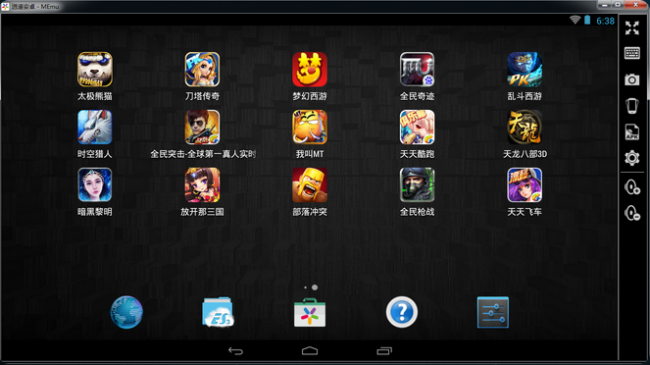
MEmu (โปรแกรม Mobile Emulator เล่นเกม เปิดแอป Android บน PC) : สำหรับโปรแกรมที่มีชื่อว่า โปรแกรม MEmu หรือชื่อเต็มๆ ของมันก็คือ Mobile Emulator มันเป็นโปรแกรมที่ถูกพัฒนาโดย บริษัท Microvirt ในเมืองเซียงไฮ้ ของประเทศจีน (China) ที่จัดอยู่ในประเภทการใช้งานคล้ายกับ โปรแกรม BlueStacks ที่หลายคนรู้จักกันดี ซึ่งตัวโปรแกรม MEmu นี้จะสามารถทำให้เล่นเกมและแอปพลิเคชัน ต่างๆ ในมือถือของระบบปฏิบัติการแอนดรอยด์ (Android) ได้บนคอมพิวเตอร์ที่มีระบบปฏิบัติการแบบวินโดวส์ (Windows) ทำให้เล่นเกม หรือ เปิดใช้งานแอปพลิเคชัน กันได้อย่างสนุกสนานและเพลิดเพลิน และ สะดวกมากยิ่งขึ้น
นอกจากนี้แล้ว โปรแกรม MEmu ยังมีการรองรับการใช้งานของเกม หรือ เปิดแอปฯ ต่างๆ ที่หลากหลาย มันมีฟังก์ชั่นที่ใช้งานที่ง่าย มีการสนับสนุนการใช้งานร่วมกับอุปกรณ์เสริมต่างๆ ที่เชื่อมต่อกับคอมพิวเตอร์ในการเล่นเกมได้เป็นอย่างดี เช่นแป้นพิมพ์คีย์บอร์ด (Keyboard) เมาส์ (Mouse) และ จอยสติ๊ก (Joystick) อีกทั้งยังมีความสามารถ ฟังก์ชั่นในการควบคุมระดับเสียง บันทึกจับภาพหน้าจอขณะใช้งาน หรือ เล่นเกม ได้เป็นอย่างดี นอกจากนี้ยังสามารถใช้งานได้กับอุปกรณ์วินโดวส์แท็บเล็ต (Tablet) อีกด้วย สำหรับใครที่ชอบเล่นเกมแอนดรอยด์บนคอมพิวเตอร์โปรแกรมนี้ถือเป็นตัวเลือกอีกตัวหนึ่งที่ดีเลยเดียว ลอง ดาวน์โหลดโปรแกรม นี้ไปใช้กันดูได้เลย
Program Features (คุณสมบัติ และความสามารถของโปรแกรม MEmu เพิ่มเติม อย่างละเอียด)
Note : โปรแกรม MEmu นี้ ทางผู้พัฒนา โปรแกรม (Program Developer) เขาได้แจกให้ ทุกท่านได้นำไปใช้กันฟรีๆ (FREE) ท่านไม่ต้องเสียค่าใช้จ่ายใดๆ ทั้งสิ้น โดยท่านสามารถที่จะ ติดต่อกับทาง ผู้พัฒนาโปรแกรมนี้ได้ผ่านทางช่องทางอีเมล (E-Mail) : support@microvirt.com (ภาษาอังกฤษ) ได้ทันทีเลย
This program is called "MEmu". It is a brand new *FREE* Android emulator that provides nearly native Android experience to all Microsoft Windows devices.
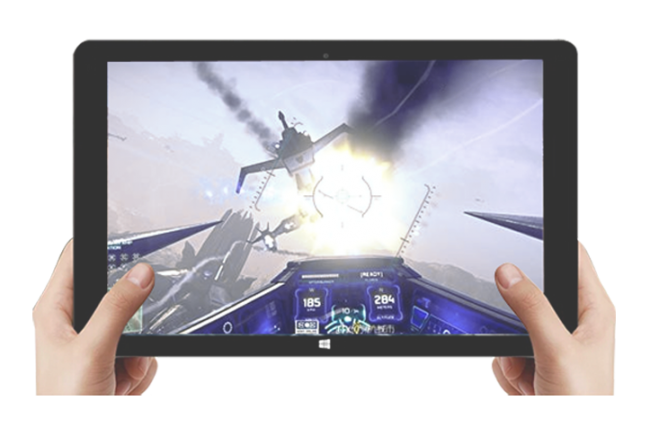
รูปตัวอย่างการใช้งานของ โปรแกรมเปิด App แอนดรอยด์ ด้วยโปรแกรม MEmu บน Windows Tablet
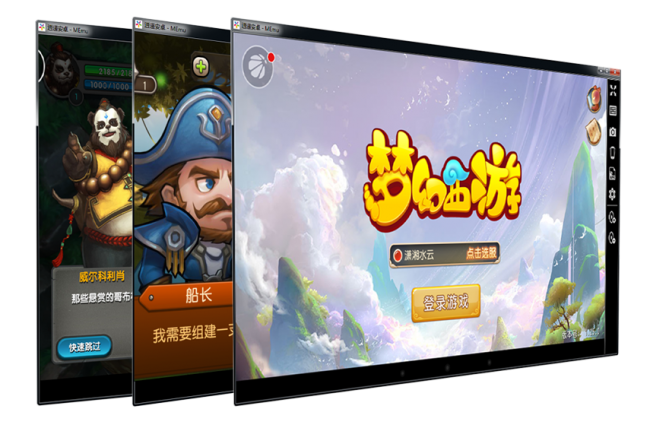
รูปตัวอย่าง Screenshot ของ โปรแกรมเปิด App แอนดรอยด์ บนมือถือ MEmu






ความคิดเห็น (8)
https://software.thaiware.com/3758-IDM.html
I published the latest version of MEmu 2.0.5
The download site is on "http://www.xyaz.cn/download.php?file_name=XYAZ-Setup&from=thaiware"
I hope thaiware can update it, who can help me?
Release notes ( Version-2.0.5 )
- Fully compatible with AMD CPU
- Grand new application interface
- Add FAQ in tool bar
- Enhance text edit function with keyboard
- Support more games
- Fix some bugs
Download link is "Http://www.xyaz.cn/download.php?file_name=XYAZ-Setup&from=thaiware"
Release notes are
- Add support for more language support (German and Korean)
- Add support for multilingual keyboard layout, including keypad
- Add support for custom launcher
- Update ES file explorer, google play games and store
- Fix the detection issue of hardware virtualization feature
- Fix some game compatibility issues
Right now your download link is already updated.