









Thaiware Shop
จำหน่าย จัดหา ซอฟต์แวร์ลิขสิทธิ์ สำหรับองค์กร ฯลฯ


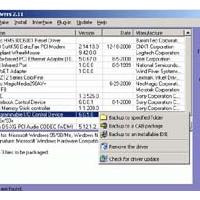
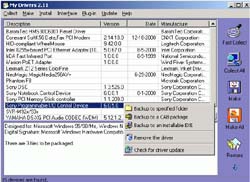
My Drivers (โปรแกรม สำรองข้อมูลของ Driver ต่างๆ) : คุณเคยที่ต้องการจะ Format เครื่องคอมพิวเตอร์ ของคุณ แต่ว่า คุณได้นึกขึ้นมาว่า ถ้า Format ไปแล้ว Driver ของ Hardware ต่างๆ ที่ลงไว้ จะไปหามาที่ไหน หรือไม่ครับ ? เพราะว่าถ้าเกิด แผ่น CD-ROM หรือ แผ่น Disk ที่เป็น Driver ของ Hardware นั้นๆ ท่านเกิดหาย สาบสูญไปขึ้นมา แล้วทีนี้จะไปหามาจากไหน ?? โปรแกรมนี้สามารถช่วยคุณได้ครับ โปรแกรมนี้เป็น โปรแกรมที่เอาไว้ ตรวจจับ หรือ ค้นหา (Detect) พวก Driver ต่างๆ ของ Hardware ที่ท่านมี อยู่ในเครื่องคอมพิวเตอร์ ทั้งหมด ออกมา และก็ โปรแกรมนี้สามารถที่จะ Backup Driver ของคุณ เอาไปไว้ใน Folder อันนึง หรือจะเป็น แผ่น Disk เพื่อที่จะให้คุณสามารถที่จะ ทำการ Format Harddisk ของคุณได้ พอเสร็จปุ๊บก็ สามารถที่จะ Restore ข้อมูล ของ Driver ของ Hardware ทั้งหมดกลับคืนมาได้อย่างง่ายดายครับ และที่สำคัญ โปรแกรมนี้จะ ติดตั้งให้ โดยอัตโนมัต หรือ Re-Install เลยละครับผม น่าสนใจ + สะดวก ต่อการใช้งานเป็นอย่างมาก เลยนะครับผม ... ลองเอาไปใช้ดูได้ครับ ...





ความคิดเห็น (17)
http://refreshcom.blogspot.com/2011/05/double-driver-backup-driver.html
หรือถ้าหาอะไรไม่เจอก้อ
http://refreshcom.blogspot.com/2011/05/driver.html
ก่อนหน้า12ถัดไป